


PC Games Radar for Epic Games,
Yuber Apps
Finding worthwhile PC game offers can take longer than actually deciding what to play. PC Games Radar is an events-focused app from Yuber Apps that brings free game offers into one place, covering stores such as Steam, Epic Games, GoG, Humble Bundle, and Origin. I found its main appeal in reducing the need to check several storefronts separately, especially when I wanted to see whether something new was available without committing to a paid purchase.
The app is free to install, which makes trying it a low-risk decision. It is aimed at Teen users and has passed the one-million-install mark, so it is not an obscure side project with no visible audience. At the same time, its average rating sits at 3.4 from roughly four thousand ratings, a useful warning that the idea is more appealing than the execution for some people. My experience reflects that split: it can be genuinely handy for deal hunters, but it works best when treated as an alert and discovery tool rather than a complete game library manager.
How PC Games Radar fits into a free-game routine
A focused way to watch several PC stores
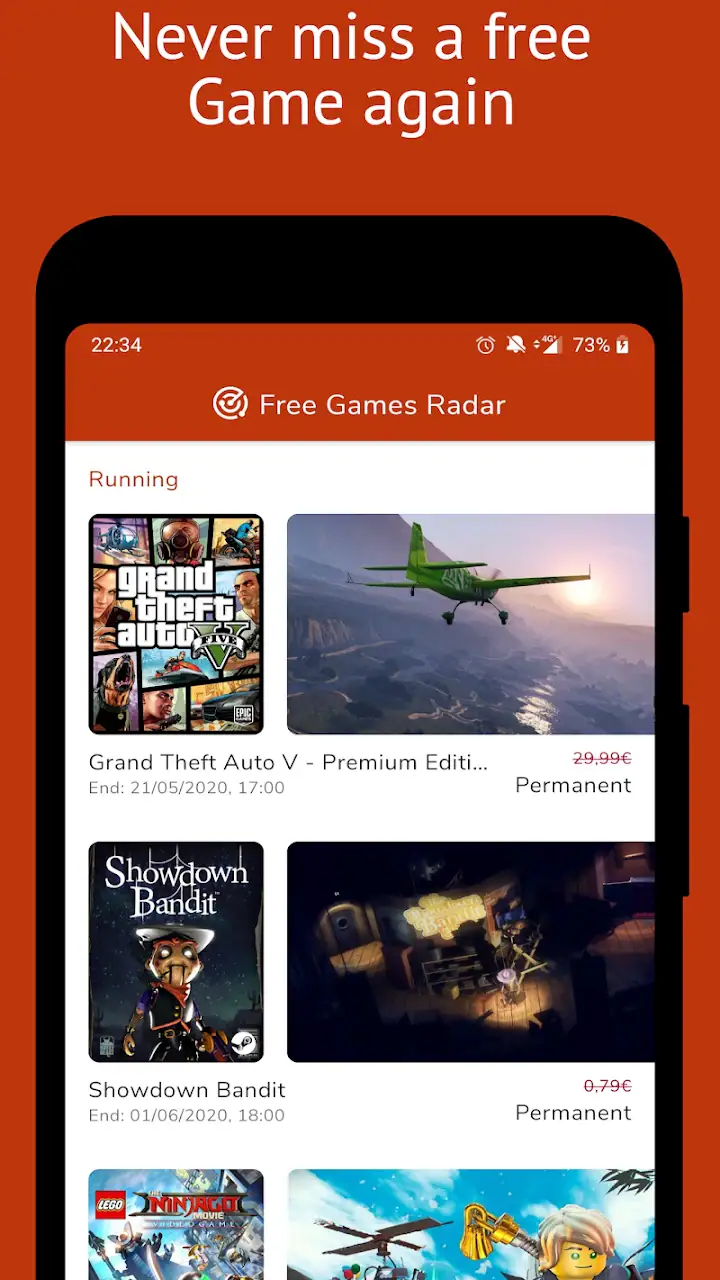
The basic job is straightforward. Instead of opening Steam, Epic Games, GoG, Humble Bundle, and Origin one after another, I can use the app as a central place to look for free game offers. That is particularly useful during busy promotional periods, when a title may be available at no cost for a limited time and then return to its usual price.
This is not the same as owning or playing games inside the app. The useful distinction is that PC Games Radar helps me discover an offer, while the relevant PC storefront remains the place where I claim or install it. That extra step matters. Someone expecting a full launcher, automatic library synchronization, or in-app gameplay will probably find the experience narrower than expected.
I see the app as a lightweight radar rather than a replacement for established stores. The name describes the role well: it helps me notice opportunities. I still need to read the offer details, check the correct storefront, sign in where necessary, and complete the claim there. Keeping that workflow in mind prevents disappointment and makes the app easier to judge fairly.
Latest News

Uber Eats Under Pressure: What Happens When Delivery Goes Wrong

How QR & Barcode Scanner Adapts to Android and iOS Innovations

Why Waze Navigation & Live Traffic Is Your Essential Travel Companion

CapCut Mastery: Unleash Hidden Features for Pro-Level Editing

How OS Updates Enhance Roblox Adventures

Teacher Simulator: Exam Time Turns Quick Classroom Judgments into a Repetitive Loop
What the free price really means
The app itself is free, so I can test it without paying an entry fee. That is the clearest value point and the reason I think it deserves a look from anyone who regularly collects PC games. There are in-app purchases listed at $3.49 per item, so free access does not mean every part of the experience is necessarily included without an optional purchase.
I would not treat those purchases as a reason to install the app, because the core attraction is already available without an upfront charge. Instead, I would first use the free version long enough to decide whether its alerts and browsing habits fit my routine. If the app saves me from missing offers, an optional purchase might feel reasonable; if I only check it occasionally, paying for extras is harder to justify.
That distinction is important when comparing it with paid deal services. PC Games Radar gives me a free way to monitor offers, but it does not turn every promotion into guaranteed savings beyond the offer itself. The value comes from convenience and awareness. I am still responsible for checking whether a game interests me, whether my computer can run it, and whether the promotion has conditions attached.
Gallery
The everyday scenario where it makes sense
Imagine I have a few minutes during a lunch break and want to see whether any PC games are currently available at no cost. Opening several store pages is tedious, and I may forget to check one of them. With PC Games Radar, I can start with one app, scan the current offers, and then move only to the storefront that has something I actually want.
That small change in routine is the app’s strongest practical benefit. It does not magically improve a game or make a store account unnecessary, but it cuts down the first stage of searching. For someone who collects games for later, that can be enough to make a difference. I also like the idea of using it before a weekend gaming session: check the radar, identify any worthwhile offer, claim it through the proper store, and then decide what to install.
There is a trade-off, though. A quick scan can encourage impulse claiming. Free does not mean useful if I never play the title, and a crowded library can become harder to navigate over time. I recommend using the app to shortlist offers rather than claiming everything automatically. A few seconds spent checking genre, platform requirements, and personal interest can prevent a collection full of games I will never open.
Where the app saves time, and where it does not
The app saves time at the discovery stage, not throughout the entire ownership process. I still need to switch to the appropriate store, deal with account access, and follow that store’s normal claiming process. If I already have a carefully organized set of store wishlists and notifications, the difference may be smaller.
For me, the best workflow is to use PC Games Radar as a first pass, then verify the offer directly before acting. This is one of the less obvious habits that makes the app more useful: I do not assume that seeing a game in the radar means I have already secured it. I treat the listing as a prompt to check the source store, especially when timing matters.
Another useful habit is separating “free to claim” from “free to play.” A promotion may concern ownership, access, or a temporary opportunity, and those ideas are not interchangeable. I would always read the store page before claiming, particularly if I am expecting a complete game rather than a trial, add-on, or limited offer. The radar helps me find the door; it does not replace reading what is behind it.
How it compares with checking stores directly
Going directly to each storefront gives me more context. Steam, Epic Games, GoG, Humble Bundle, and Origin can show system requirements, user feedback, screenshots, editions, and account-specific details in a way a focused radar may not. If I am making a careful purchase decision, the original store is the better final destination.
PC Games Radar is more convenient when the question is simply, “What free PC game offers should I look at today?” It reduces the number of places I need to remember. That makes it different from a store app, a launcher, or a full price-comparison service. Its value is strongest before the decision, not after I have chosen a game.
I would also compare it with manually following gaming news or social feeds. Those sources can provide more explanation and commentary, but they are noisier. The app’s narrower purpose may be preferable when I want a quick list rather than a stream of unrelated announcements. On the other hand, readers who enjoy detailed deal analysis may still prefer a community or news source that explains why an offer is worth attention.
Small details that affect the experience
The current version is 3.1.2, and the app supports Android from version 5.0 onward. That broad compatibility makes it approachable for people using older Android hardware, although compatibility alone does not guarantee that every device will feel equally smooth. I would still keep expectations realistic if I were using an aging phone or a device with limited storage.
The Teen content rating is another practical detail for households. It tells me the app is not positioned as a children’s-only utility, so parents should consider whether the linked game offers and surrounding store content fit the user. The rating does not tell me whether every promoted game is suitable for every teenager, which is another reason to inspect the individual store page before claiming anything.
One friction point with this type of app is trust in timing. Free offers can change, and a discovery app is only useful if I act while an opportunity is still available. I would not rely on a notification or a remembered listing alone. My tip is simple: when something interests me, check it promptly and confirm the offer at the original store. That workflow protects against treating an old discovery as a current entitlement.
Who will get the most value
The strongest audience is a PC player who enjoys collecting games but does not want to monitor several storefronts every day. It is also a good fit for someone building a library on a tight budget, because the app makes free offers easier to notice without charging an installation fee.
It can be useful for newcomers who are still learning how the PC game-store ecosystem works. Rather than starting with five different apps and websites, they can use one radar to find possibilities, then learn the individual stores gradually. The app will not explain every account or installation detail for them, but it gives their search a manageable starting point.
I also see value for occasional players who do not want to spend time browsing sales. If I only play on weekends, I may not need a sophisticated deal-tracking setup. A quick check before deciding what to play can be enough. The app is especially sensible when the goal is discovery rather than finding the absolute lowest price on a specific paid title.
Who should probably skip it
I would skip PC Games Radar if I already have a reliable system for monitoring the same stores and rarely miss promotions. Adding another app would create one more place to check without solving a real problem. I would also skip it if I expect it to manage my library, install games, or provide a unified launcher, because that is not the role I would assign to it.
It may not suit people who prefer to research every title in depth before seeing an offer. A radar-style tool can surface a lot of possibilities, but the quality of the final decision still depends on the user. If I care about reviews, technical performance, multiplayer activity, or long-term support, I need to continue that research elsewhere.
Finally, I would be cautious about optional spending. Since the app is free to access but lists $3.49 in-app items, I would not buy anything until the free experience has demonstrated a clear benefit in my own routine. Someone who checks only once a month may receive enough value from the free side and have no practical reason to pay.
My final recommendation
After using it as a discovery layer, I think PC Games Radar is worth trying for people who actively look for free PC game offers across multiple stores. Its best quality is not depth; it is concentration. It puts the first step of the search in one place and can make a scattered routine feel more manageable.
My recommendation comes with a clear boundary: use it to find opportunities, then verify and claim them through the relevant storefront. Do not confuse the radar with a launcher, a library, or a guarantee that every listing will match your interests. That extra checking is not a flaw unique to this app, but it is essential to getting real value from it.
The 3.4 average rating from about four thousand ratings suggests a mixed experience, and I think that is fair. The concept is useful, while the practical payoff depends heavily on how often I search for offers and how much I dislike checking stores manually. Its audience has grown beyond one million installs, but popularity does not make it essential for everyone.
My verdict is to install it if free-game discovery is part of your normal PC routine, but skip optional purchases until the app proves it saves you meaningful time. For a free app in the Events category, that is a reasonable value proposition: modest, focused, and potentially helpful. I would recommend it to a friend who keeps missing promotions, while telling a serious deal researcher to compare its convenience with the richer details available directly from each store.
Yuber Apps has made a practical utility rather than a complete gaming destination. That is exactly why I find it useful in the right situation and easy to dismiss in the wrong one. If I want a quick radar for free offers, it earns a place on my phone. If I want purchasing advice, technical analysis, or one app to control my entire PC library, I would choose a different tool.
FAQs for PC Games Radar for Epic Games,
What is PC Games Radar for Epic Games?
PC Games Radar for Epic Games is a comprehensive app designed to keep gamers updated with the latest news, updates, and reviews related to Epic Games. It offers insights into new releases, patch notes, and game guides, making it an essential tool for avid gamers who want to stay informed about their favorite Epic titles.
Is PC Games Radar for Epic Games free to use?
Yes, PC Games Radar for Epic Games is free to download and use. However, it may offer in-app purchases or subscriptions for premium features such as ad-free browsing, exclusive content, or early access to certain reviews and news articles. Check the app store listing for specific pricing details.
Does PC Games Radar for Epic Games require an internet connection?
Yes, an internet connection is required to access the latest news, updates, and reviews on PC Games Radar for Epic Games. While some content may be available offline once downloaded, the app relies on a live connection to ensure users receive the most current and accurate information.
How frequently is the content updated on PC Games Radar for Epic Games?
The content on PC Games Radar for Epic Games is updated regularly, often daily, to provide users with the latest news, reviews, and updates on Epic Games. The app strives to keep its content fresh and relevant, ensuring gamers are always informed about new developments and releases.
What devices support PC Games Radar for Epic Games?
PC Games Radar for Epic Games is available for both Android and iOS devices. Ensure your device meets the minimum system requirements specified in the app store to guarantee optimal performance. Regular updates may be needed to maintain compatibility with new operating system versions.
Pros
- User-friendly interface for quick navigation.
- Comprehensive coverage of new game releases.
- Detailed reviews and ratings for each game.
- Customizable alerts for game updates.
- Exclusive interviews with game developers.
Cons
- Limited offline access to content.
- Occasional ads can be distracting.
- Some features require a premium account.
- Limited coverage of indie games.
- Occasional bugs in the app's interface.


